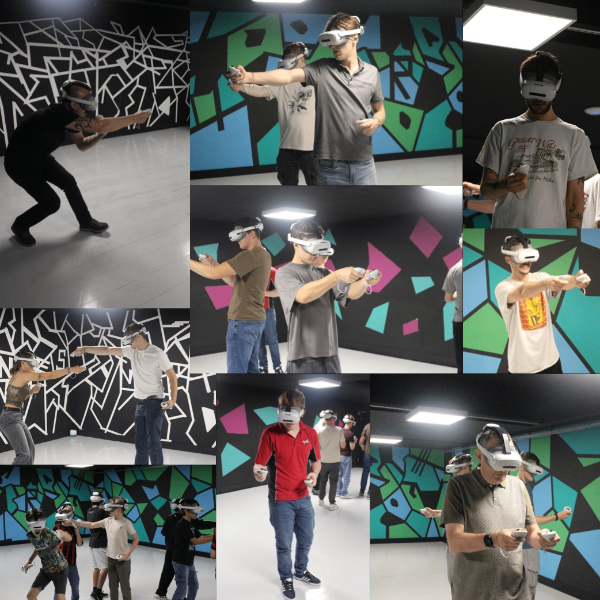
Discover an Unforgettable Virtual Reality Experience
Step Into a Virtual Reality Experience
Imagine soaring through the sky, exploring an underwater world or taking on a thrilling new challenge — all without leaving the room. A virtual reality experience uses a headset and interactive technology to place you inside a computer-generated world, making you feel as though you are part of the action.
What is virtual reality?
Virtual reality, often called VR, creates a three-dimensional digital environment that you can look around and interact with. A headset displays the virtual world, while movement-tracking technology responds as you turn your head or move. Some experiences also use controllers, allowing you to pick up objects, solve puzzles or play games.
Unlike watching a film or playing a game on a screen, VR can make the experience feel wonderfully immersive. Look up, down or behind you, and the scene changes with you.
Adventure, play and discovery
VR experiences come in all kinds of styles. You might find yourself exploring a fantastical landscape, racing through a colourful course, completing a team challenge or discovering places that would be difficult to visit in real life. There are experiences for different ages, interests and confidence levels, from gentle explorations to more action-packed adventures.
For families and friends, virtual reality can also be a brilliant way to share an activity. Take turns, cheer each other on and compare what you discovered. It’s a chance to try something new together — and perhaps see who has the steadiest hand or sharpest eye!
A few tips before you begin
- Choose an experience that suits your age, interests and comfort level.
- Listen carefully to the instructions before putting on the headset.
- Make sure there is enough clear space around you to move safely.
- Take a break if you feel uncomfortable, dizzy or tired.
- Follow any age guidance and supervision advice provided by the venue.
Ready to explore?
A virtual reality experience offers a fresh way to play, imagine and explore. Whether you’re curious about new technology or simply looking for an exciting activity to enjoy with others, VR opens the door to worlds limited only by imagination.
Top Tips for a Safe and Enjoyable Virtual Reality Experience
- Adjust the headset for a comfortable fit.
- Clear your play area before starting.
- Take breaks to avoid eye strain.
- Use the wrist straps on your controllers.
- Start with gentle experiences if you’re new to VR.
- Stop if you feel dizzy or unwell.
Adjust the headset for a comfortable fit.
Before starting your virtual reality experience, adjust the headset so it feels secure but not too tight. Position the lenses clearly in front of your eyes and use the straps to keep the headset steady without putting pressure on your face. A comfortable fit helps you enjoy the experience and keeps the picture clear. If it feels uncomfortable or blurry, pause and readjust it before continuing.
Clear your play area before starting.
Before putting on your VR headset, clear your play area of furniture, toys, cables and other obstacles. Make sure you have enough room to move your arms and take a step safely, and follow the venue’s instructions about staying within the designated space. A tidy area helps you enjoy the experience with greater confidence and reduces the risk of bumping into something while immersed in the virtual world.
Take breaks to avoid eye strain.
Remember to take regular breaks during a virtual reality experience to give your eyes a rest and help prevent eye strain. Pause between sessions, remove the headset and look at something in the distance for a few minutes. If your eyes feel tired or uncomfortable, stop and take a longer break before continuing.
Use the wrist straps on your controllers.
Always use the wrist straps on your VR controllers, especially during energetic games or activities. They help keep the controllers secure if you let go or lose your grip, reducing the risk of damage or injury. Adjust the straps so they fit comfortably, and check they’re fastened before you start playing.
Start with gentle experiences if you’re new to VR.
If you’re new to virtual reality, start with a gentle experience to help you get used to wearing the headset and moving around in a virtual world. Choose something calm, with simple controls and little movement, before trying faster or more immersive activities. Take your time, and pause or remove the headset if you feel uncomfortable.
Stop if you feel dizzy or unwell.
If you feel dizzy, unwell or uncomfortable during a virtual reality experience, stop straight away and remove the headset safely. Sit down and take a break until you feel better, and let a member of staff know if symptoms continue. There’s no need to push through — your comfort and safety come first.